Your first chapter in three moves.
OpenTales becomes useful as soon as prose exists. Build the smallest container your story needs, then let structure grow around the draft.
- 01
Create or open a project
Give it a title. Genre, voice, and themes can stay rough.
- 02
Add an act, then a chapter
Use the + controls at the top of Manuscript.
- 03
Click the chapter and write
The editor accepts Markdown and updates word count as you go.
Saving is automatic. The amber status bar shows the active branch, issue count, words, and sync state. Wait for Synced before closing the tab.
Five regions. One manuscript.
The layout stays stable while the content changes. Once you know these regions, every tool has a predictable home.
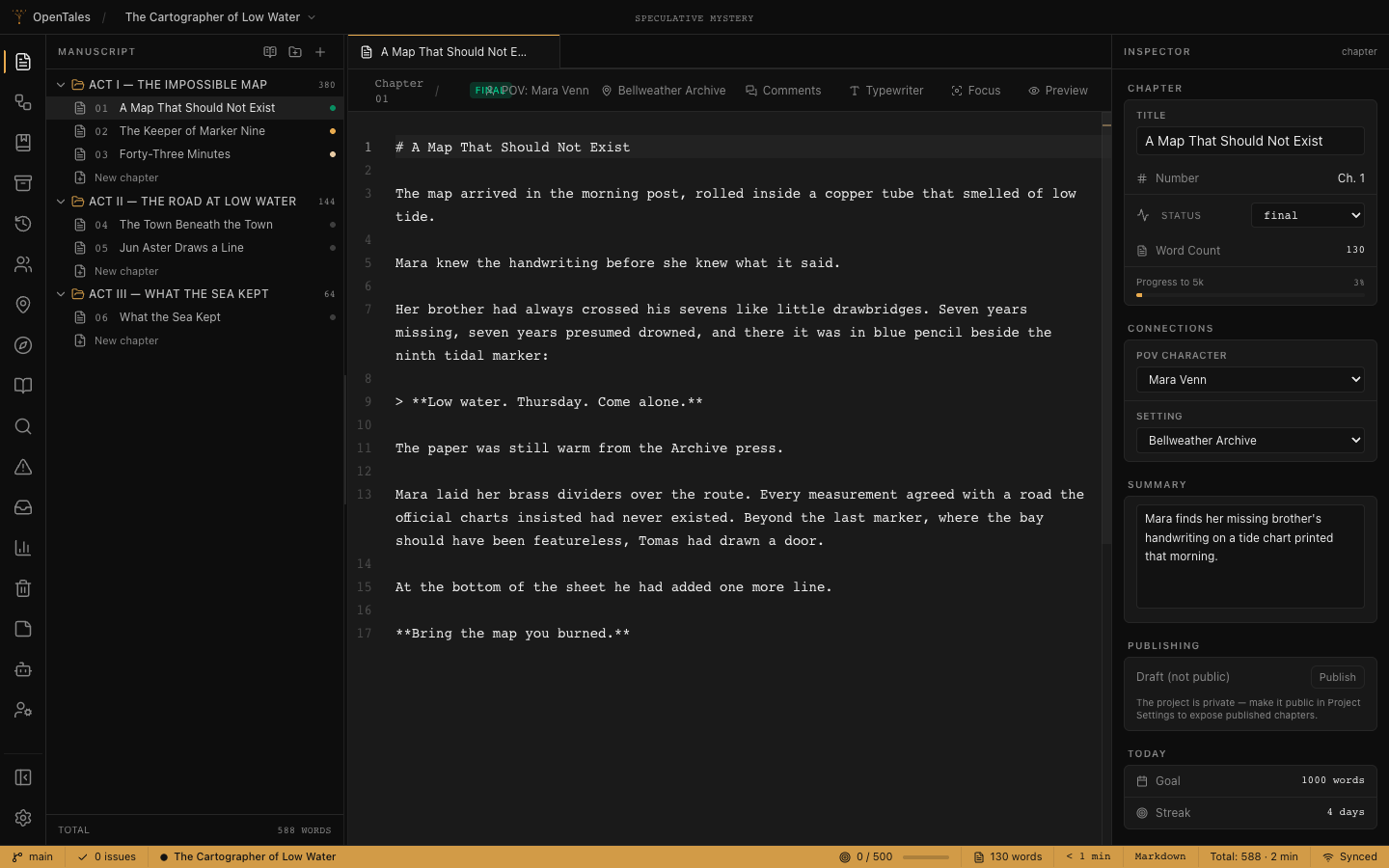
- A Activity bar
- Switch between Manuscript, Characters, Plot, Search, Problems, Builds, Publish, and the rest of the project.
- B Side panel
- Browse or create items for the active area. In Manuscript, this is your act and chapter tree.
- C Editor
- Your focused work surface. Tabs let you keep prose and reference material open together.
- D Inspector
- Edit the active item's status, POV, setting, summary, links, and publishing state.
- E Status bar
- A quick truth check: current branch, open problems, project and chapter word counts, and whether the latest edit reached the server.
Give the draft context, not paperwork.
Add information when it helps you make the next scene more specific. Empty fields are not unfinished work.
Characters
Track role, traits, aliases, motivation, arc, relationships, and reference images. Link a POV character from the chapter Inspector.
Locations
Keep atmosphere, significance, and sensory details close to the scenes that use them.
Plot & Outline
Set the premise, POV, voice, theme, climax, acts, chapters, and scene metadata. Start broad; deepen only what guides the draft.
Docs & Notes
Store research, loose threads, references, and project instructions in folders beside the manuscript.
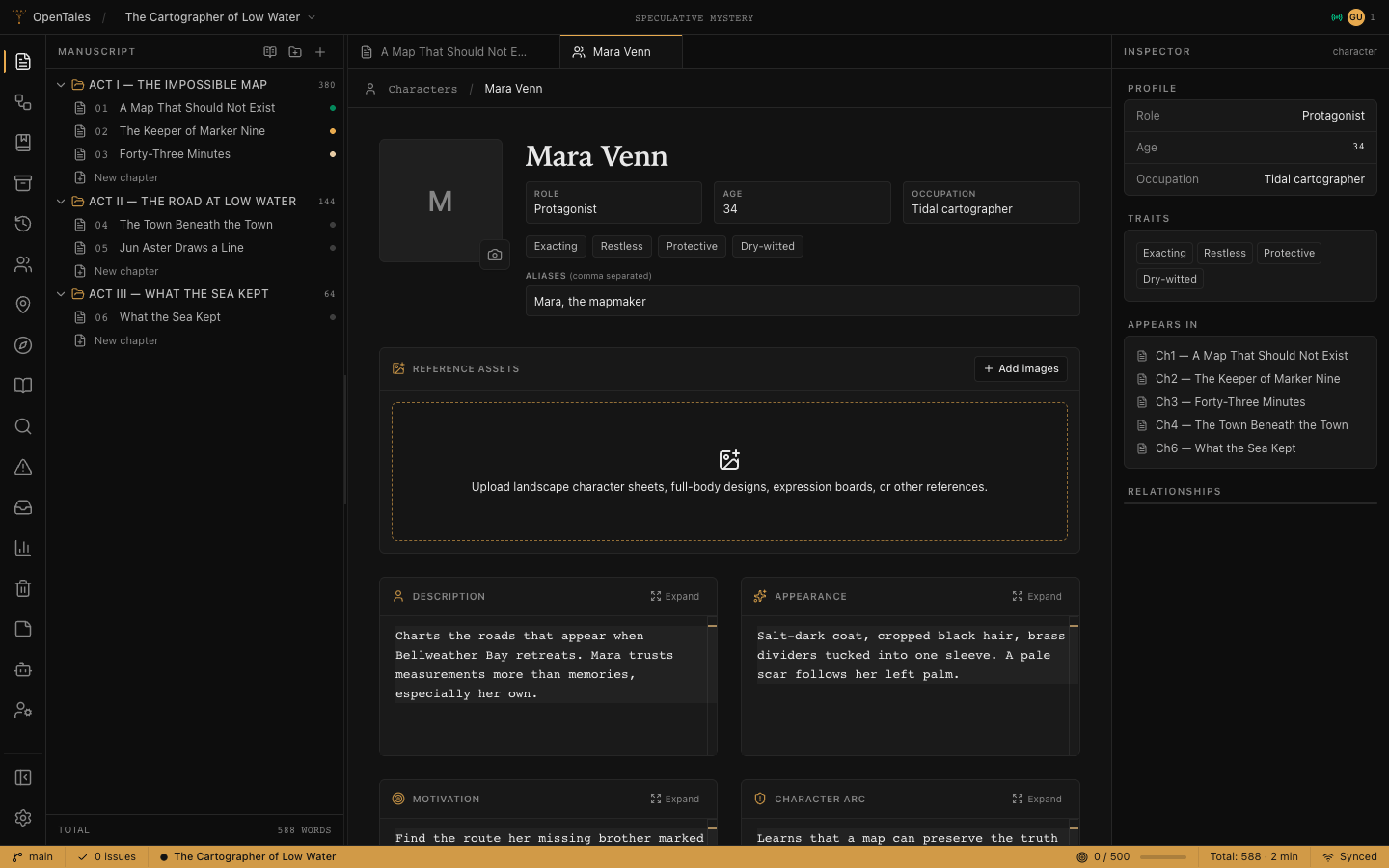
Stay in the sentence. Zoom out when needed.
- Focus and Typewriter reduce visual drift.
- Preview renders the current Markdown chapter.
- Continuous manuscript reads or edits every chapter in order.
- Search finds exact text, fields, structure, and references across main and build prose.
- Problems keeps local checks and evidence-backed story diagnostics in one place.
- Revisions creates named snapshots and compares changes without deleting history.
Let AI propose. You keep authorship.
Enable a provider in Project Settings only when you want it. Interactive AI defaults to Manual mode, so project-changing tools wait for your review.
Assist
Chat, inspect the manuscript, and approve proposed changes one at a time.
Plan & Review recommended
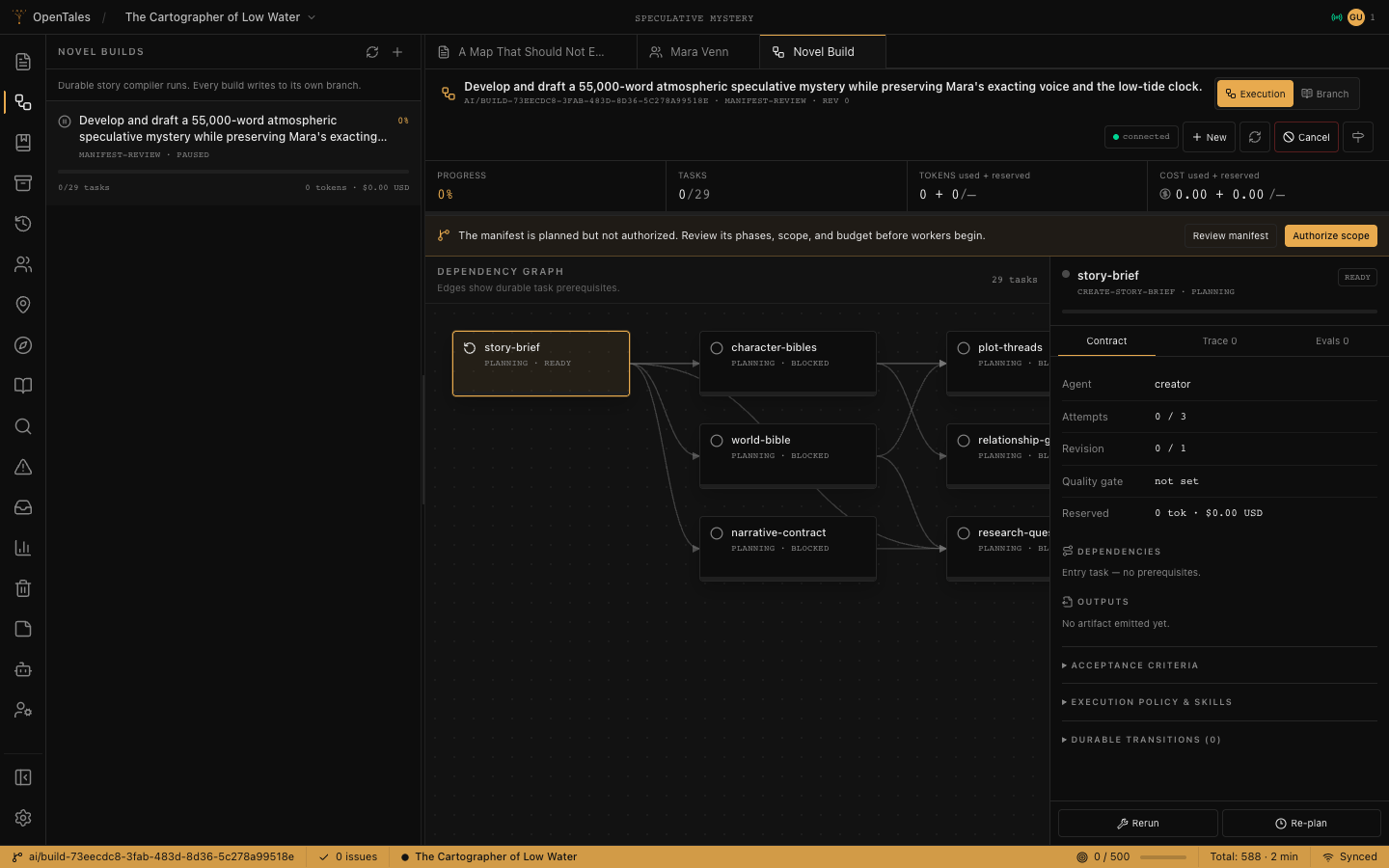
Build a complete plan, review the manifest, then authorize prose on an isolated manuscript branch.
Autonomous Draft
Requires explicit scope plus finite token and cost limits. Final merge still belongs to the owner.
- 01
Brief it. Add the brainstorm, target, tone, constraints, and autonomy mode.
- 02
Review the manifest. Check phases, scope, chapter target, and budget before work begins.
- 03
Authorize deliberately. Pause, resume, retry, or re-plan from the durable task graph.
- 04
Compare before merge. Build prose never changes main until an owner approves the frozen review.
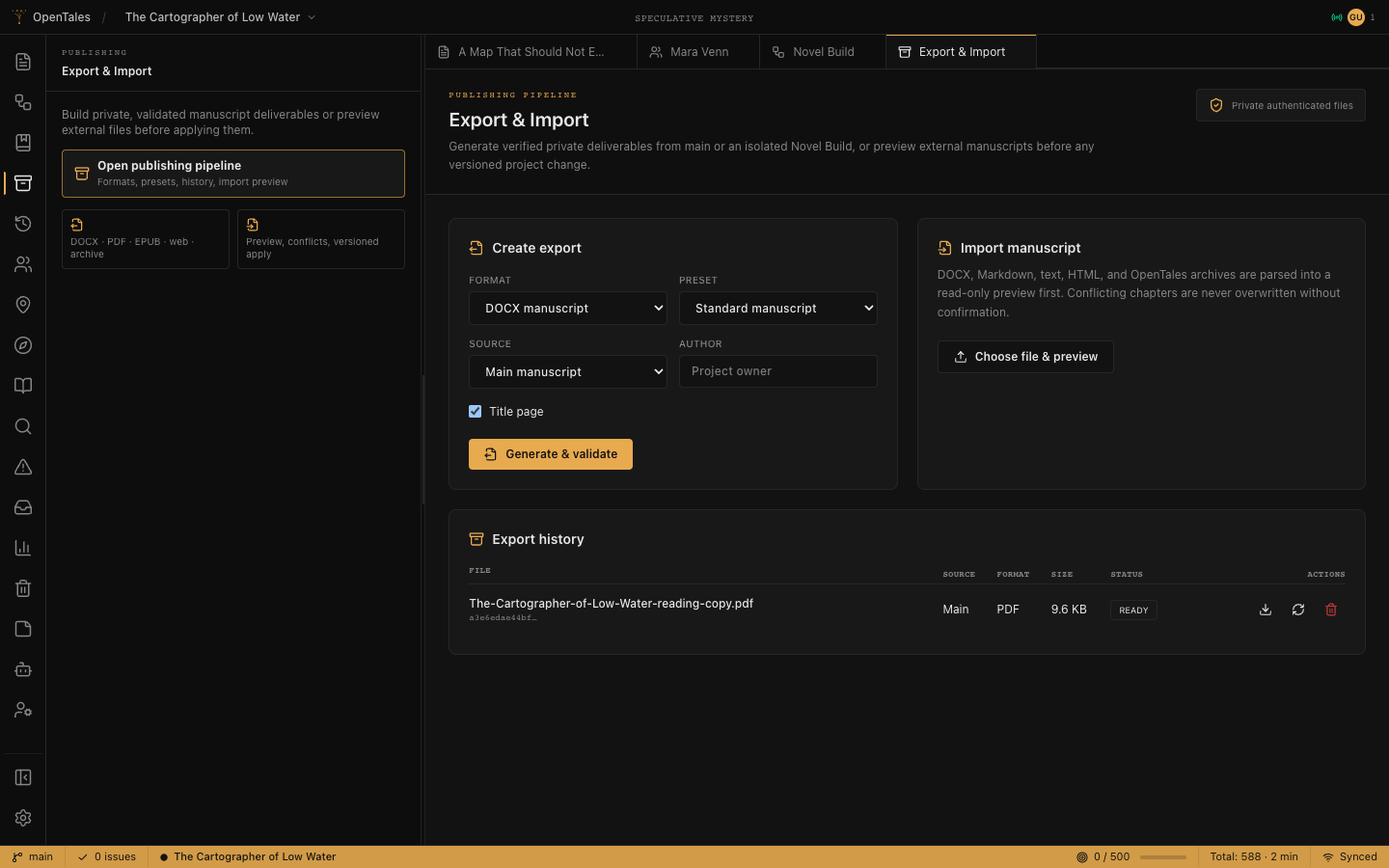
Export a manuscript, not a mystery file.
Open Publishing from the activity bar. Choose main or a compiled Novel Build, a format, and a preset. OpenTales validates the result before it appears in history.
Bring an existing draft
DOCX, Markdown, text, HTML, and OpenTales archives open as a read-only preview first. Review chapter mapping and conflicts before applying.
Share with intention
Invite collaborators for project work. For public reading, make the project public in Settings, then publish only the chapters readers should see.
Imports do not silently overwrite prose. Applying a confirmed preview creates new writing versions, so the prior text remains part of project history.
The questions worth answering now.
Can I use OpenTales without AI?
Yes. AI is disabled per project until you enable a provider. Drafting, story structure, search, local Problems checks, revisions, collaboration, and publishing remain useful without it.
Is the manuscript available offline?
The PWA can cache the application shell, but the server and PostgreSQL database remain authoritative for project data. Treat Synced—not the presence of the window—as confirmation that an edit is stored.
Can AI overwrite my main chapters?
Interactive changes wait for approval in Manual mode. Novel Build prose stays on isolated build branches until an owner reviews and merges a frozen compilation.
What should I use when I feel lost?
Press ⌘K or Ctrl K and type the chapter, character, location, panel, or action you want. Press ? outside an input to open the shortcut guide.
Self-host or help build it.
Stop here if you only came to write. Everything below is for people running or changing OpenTales.
Run a local instance
You need Node.js 20+, pnpm 10+, and Docker or PostgreSQL 15+. Copy the environment file and replace JWT_SECRET with a long random value.
git clone https://github.com/Hoodgail/opentales.git
cd opentales
pnpm install
pnpm dev:deps
cp packages/backend/.env.example packages/backend/.env
pnpm --dir packages/backend prisma:generate
pnpm --dir packages/backend prisma:migrate
pnpm --dir packages/backend prisma:seed
Run pnpm dev:backend and pnpm dev:web in separate terminals, then open localhost:5173. The seed login is [email protected] / password123.
Before exposing an instance publicly, configure HTTPS and CORS, persistent database and asset storage, strong secrets, backups, and a reverse proxy. The checked-in production compose file expects the project's proxy network; adapt it to your host.
Contribute a change
Create a focused branch, keep the frontend on Svelte 5 runes, follow controller → use case → repository boundaries in the backend, and include a Prisma migration for schema changes.
pnpm lint
pnpm test
pnpm eval
pnpm buildReport the confusing moment, not just the missing feature. That is how this guide stays short and useful.